
A website does not always need to be rebuilt from scratch to become better.
Sometimes the biggest problems are much simpler. The homepage may be difficult to understand, important information may be buried, the contact process may be too complicated, or the site may simply need a better visual structure. A full redesign can solve these problems, but it is not always the first thing you should do.
If the existing website is technically sound and still represents the business reasonably well, a few targeted improvements can sometimes produce a much better result for considerably less time and money. Here are five areas worth looking at before deciding that your entire website needs to be replaced.
1. Make the Homepage Easier to Understand
The first question a visitor should be able to answer is simple:
What does this business do?
If someone lands on your homepage and has to read several paragraphs before understanding what you offer, there is a problem. A good homepage does not need to explain everything immediately. It needs to give visitors enough information to understand where they are, what the business offers and what they should do next.
Start with the main message.
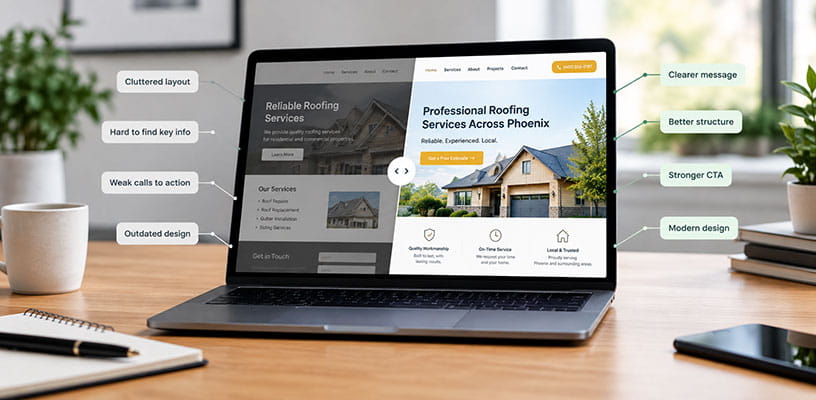
Your headline should explain what you do rather than simply making a vague statement about quality or service. For example: “Professional Roofing Services Across Phoenix” is much more useful than: “Quality You Can Trust.”
The second statement may sound good, but it does not tell the visitor anything. Once the main message is clear, the rest of the homepage can support it with services, proof, projects, testimonials and a clear call to action. You may not need a new website. You may simply need a better homepage structure.
2. Improve the Path to Contact
A surprising number of business websites make contacting the company harder than it needs to be.
The visitor may have to find the contact page, scroll through a large amount of information and then complete a form with unnecessary fields. That creates friction.
If the purpose of the website is to generate enquiries, the path to contacting the business should be obvious. Depending on the business, that could mean:
- A clear phone number in the header
- A visible “Get a Quote” button
- A short enquiry form
- Clear calls to action throughout the page
- A contact section near the bottom of important service pages
- Click-to-call functionality on mobile
This does not mean putting a huge red button on every section of the website. It means making the next step obvious when someone is ready to take it. A visitor who has just finished reading about a service should not have to go searching for a way to request more information.
3. Fix the Pages That Matter Most
Another common mistake is assuming that every page needs the same amount of attention.
It doesn’t.
If you run a local service business, your homepage, main service pages and contact page are probably much more important than an old blog post from five years ago. Start by identifying the pages that actually matter to the business. Look at:
- Which pages receive the most traffic
- Which services generate the most enquiries
- Which pages rank in search results
- Which pages visitors leave quickly
- Which pages are linked from advertising campaigns
- Which pages contain your most important calls to action
Then improve those pages first.
This can involve rewriting content, restructuring sections, improving images, simplifying navigation or adding stronger calls to action. There is little value in spending hours redesigning a page that almost nobody visits while the main service page remains difficult to use.
4. Replace Weak or Outdated Content
A website can have a modern design and still feel outdated because of its content.
Look at the information currently on the site. Are the opening hours correct? Are the services still accurate? Are the team members still there? Are the photos from ten years ago? Does the website still mention promotions that ended months ago? Are there references to old technology, old processes or outdated information? These details affect how visitors perceive a business.
They can also create practical problems.
For example, if a company has changed its services but the website still describes the old offering, potential customers may leave without ever making contact. Updating content is one of the simplest website improvements you can make. It is also one of the easiest to overlook.
5. Improve Mobile Usability
This one is easy to test.
Open your website on your phone and actually use it as a customer would. Don’t just check whether everything technically fits on the screen. Try to complete a task. Find a service. Read the important information. Look at the images. Find the phone number. Complete the contact form. Navigate to another page. Then ask yourself how easy the process actually feels.
Common mobile problems include:
- Text that is too small
- Buttons that are difficult to tap
- Navigation that is confusing
- Large sections that require excessive scrolling
- Forms that are uncomfortable to complete
- Images that slow the page down
- Important information pushed too far down the page
A website can technically be “mobile responsive” and still provide a poor mobile experience. Those are not the same thing.
When Should You Actually Redesign the Website?
After making these improvements, you may discover that the existing website is perfectly usable. That’s a good outcome. You don’t need to redesign something simply because it is several years old.
However, sometimes these improvements reveal a larger problem. If the website has outdated technology, a poor underlying structure, inconsistent design, difficult content management or years of additions that no longer work together properly, continuing to patch it may not make sense.
At that point, a redesign or redevelopment can be the better option. The important thing is to identify why the website needs to change before deciding how much work it needs.
Don’t Confuse “Old” With “Bad”
A website can look older than current design trends and still perform its job well. It can also look modern and still be terrible at generating enquiries. The goal should not be to make a website look new for the sake of looking new.
The goal is to make it easier for the right people to understand the business, find the information they need and take the next step. Sometimes that requires a complete redesign. Sometimes it requires five relatively simple improvements. The only way to know which one you need is to look at the actual problems first.
Final Thoughts
Before committing to a complete website redesign, take a closer look at what is actually holding the current site back. A clearer homepage, a simpler contact process, better service pages, updated content and a stronger mobile experience can make a noticeable difference without rebuilding everything.
And if those improvements still don’t solve the underlying problems, you’ll have a much better understanding of what the new website actually needs to accomplish. Need help improving an existing website?
GL Creative Media provides website design, WordPress development and website redesign services for businesses that want a website that works better, not simply one that looks newer.